Academic records and GPA, kept up to date for every student
Ilmoria keeps each student's academic record in one place: their programme and study plan, what they have passed, what is left to graduate, and their semester and cumulative GPA on the 4.0 scale. Academic standing follows your university's rules, advisors see their advisees at a glance, and students can try a what-if GPA calculator before results are out.
Degree progress at a glance
Credits earned against the programme, and the courses still left in the study plan.
One GPA everywhere
Semester and cumulative GPA on the 4.0 scale, worked out the same way on every page.
Standing by your rules
Dean's list, warning and probation, from the GPA thresholds you choose.
Programmes and study plans
Your university's structure lives in Ilmoria: colleges, departments and programmes, each programme with its degree, length and the credits needed to graduate. The study plan lists the courses a programme requires, grouped as university, college, major and elective requirements, with the year and semester each is usually taken. The course catalogue holds each course's level, credits and prerequisites, the same data the course registration checks rely on.
Degree progress for students and advisors
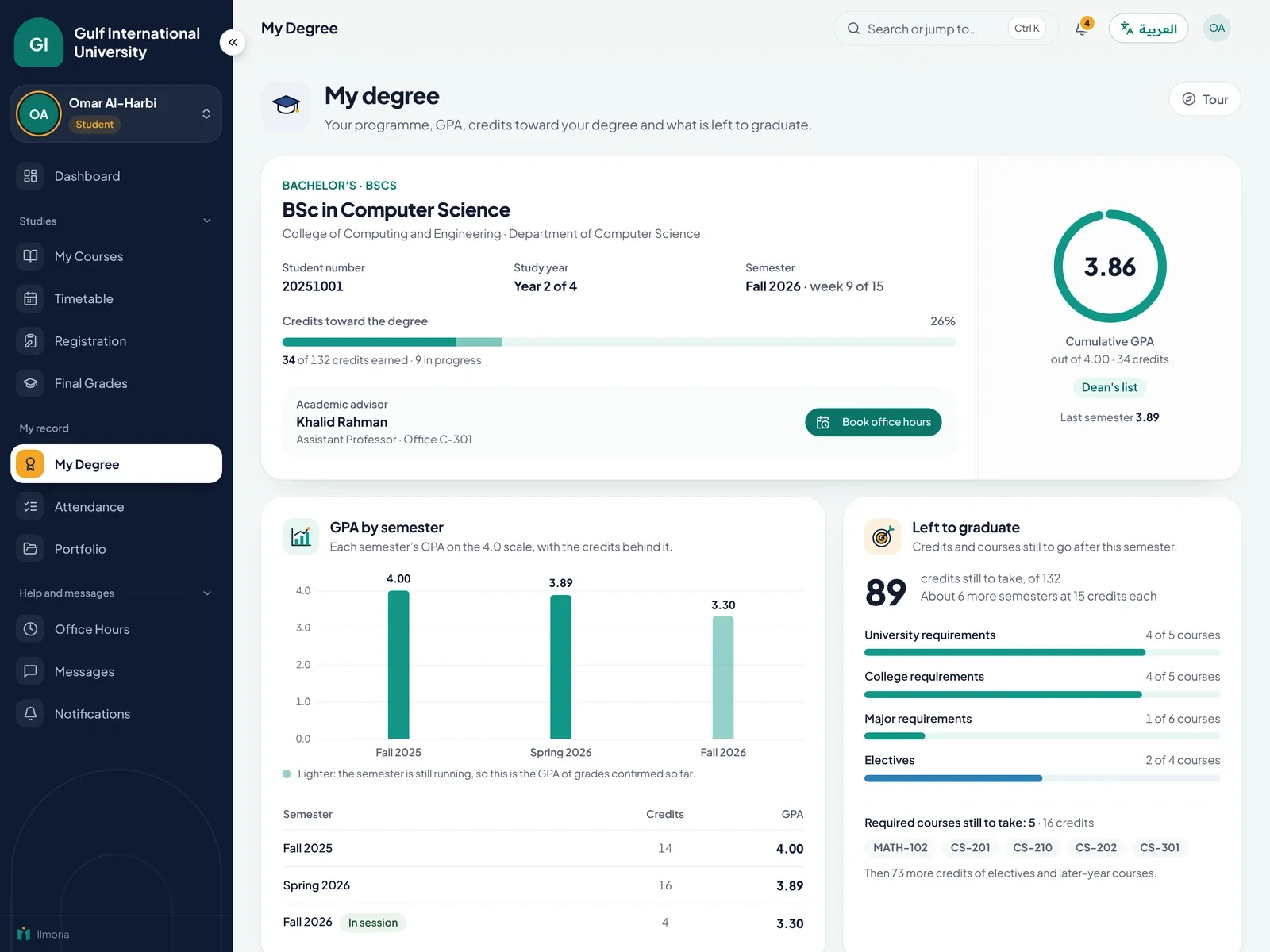
Each student sees their programme, their advisor, the credits they have earned against what the degree needs, and their study plan with every course marked as passed, in progress or still to take. Semester by semester, the record lists each course with its credits, letter grade and grade points. That answers the two questions students most often bring to the registrar's office: how much is left, and which courses come next.
How semester and cumulative GPA are calculated
Ilmoria uses the 4.0 scale throughout. The semester GPA counts the courses finished in that semester. The cumulative GPA counts every course once, with its latest grade, so a repeated course replaces the earlier result. Withdrawn (W), incomplete (I) and pass (P) grades count in neither. Transcripts, dashboards and standing reports all use the same calculation, so the GPA a student sees is the GPA the registrar sees. Our guide on how to calculate GPA works through an example.
- A+ and A: 4.0, A-: 3.7
- B+: 3.3, B: 3.0, B-: 2.7
- C+: 2.3, C: 2.0, C-: 1.7
- D+: 1.3, D: 1.0, D-: 0.7, F: 0
Academic standing: Dean's list, warning and probation
Standing is worked out from the cumulative GPA, using thresholds your university sets. By default, a cumulative GPA under 2.3 is an academic warning and under 2.0 is probation, while a semester GPA of 3.5 or more with at least 12 credits puts a student on the Dean's list. You can change each figure to match your regulations. The registrar sees standing across the university, for one semester or cumulatively, and exports the list as CSV for deans and committees.
A what-if GPA calculator, and tools for advisors
Before results are out, a student picks the grade they expect in each course in progress and sees what their semester and cumulative GPA would become. “Can I get off probation this term?” turns into a number. Advisors see their advisees with GPA, credits, standing, attendance warnings and pending registration requests, and keep private advising notes on each one. Where your university lets advisors approve registration, they decide requests from the same page. See the full picture on the higher education page.
Common questions
How is cumulative GPA calculated?
Ilmoria multiplies each course's grade points by its credits, adds the results and divides by the total credits that count. On the 4.0 scale, an A is worth 4.0, a B 3.0 and a C 2.0. Each course counts once, with its latest grade, so a repeated course replaces the earlier result. Withdrawn, incomplete and pass grades are left out of the calculation.
Can we set our own rules for the Dean's list and probation?
Yes. An administrator sets the GPA that triggers an academic warning, the GPA for probation, and the semester GPA and minimum credits for the Dean's list. The defaults are 2.3, 2.0, and 3.5 with 12 credits. Every page, report and transcript then applies the same rules, so students, advisors and the registrar never see different answers.
How does the what-if GPA calculator work?
The student picks an expected letter grade for each course still in progress. Ilmoria folds those grades into the real record, using the same rules as the official GPA, and shows the projected semester and cumulative GPA. Nothing is saved to the record. With no grades picked, the calculator simply shows the student's current GPA.
What do academic advisors see?
Advisors see a list of their advisees with each student's GPA, credits earned, academic standing, attendance warnings and registration requests. They can open a student's full record and keep private advising notes. If your university has advisors approve registration, they approve or decline their advisees' requests from the same page, with a note the student can read.
Can students get an official transcript?
Yes. Transcripts are generated from confirmed final grades and show GPA and credits. Each one goes through an approval step before it is issued as an official PDF in your university's design, with your logo and colours. Until then, students and parents follow grades and GPA on their dashboards. You can book a demo to see a sample transcript.
Is Ilmoria a student information system?
Ilmoria covers many student information system tasks for universities: programmes and study plans, course registration, grades, GPA, academic standing, attendance and transcripts. It does not connect to an outside SIS, so if you keep another system, decide which records belong where. Our guide to LMS vs SIS walks through that decision.
See how Ilmoria would work in your school
A 30-minute call with a product specialist. Bring your timetable, your grading rules and your toughest question, and we’ll show you how Ilmoria handles them, in English or Arabic.
Or email sales@ilmoria.com