A student attendance system that applies your absence limit for you
Instructors take attendance for each class in a few taps: present, absent, late or excused. Ilmoria counts absences against your university's limit, warns students as they get close, and shows who is barred from the final exam. Students and parents see the same numbers, and students book office hours from the same place.
Four statuses per class
Present, absent, late or excused, with an optional note for each student.
The limit, applied for you
A warning near the limit, and barred from the final exam once it is passed.
Office hours students book
Instructors open weekly slots and students book a time that suits them.
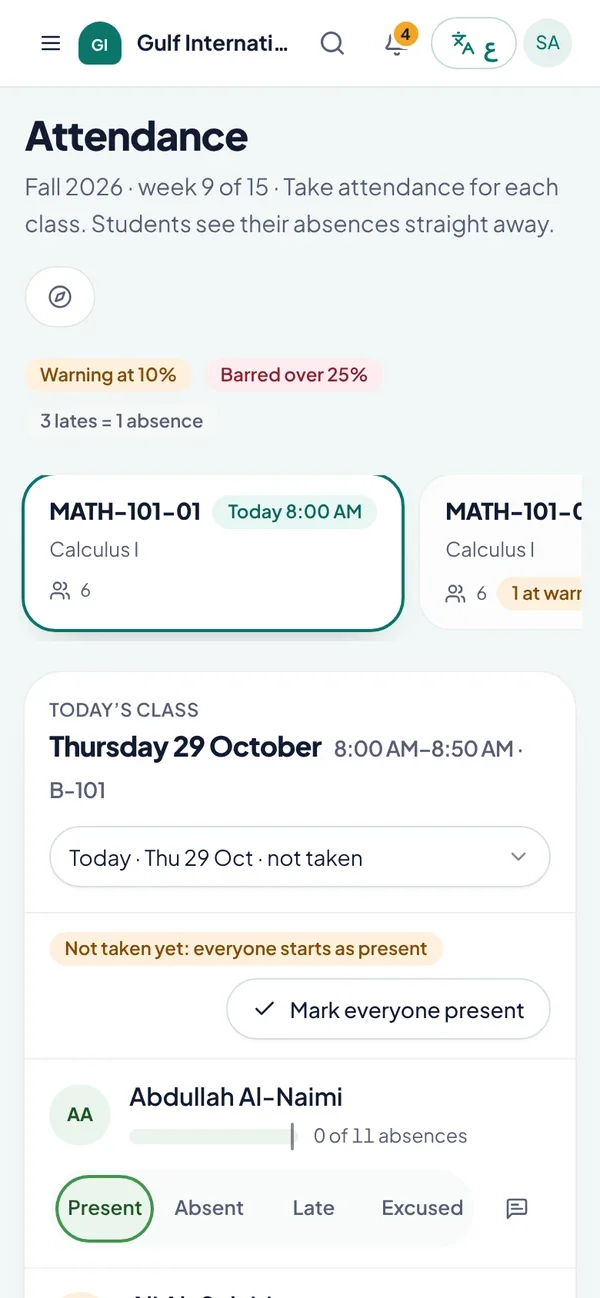
Take attendance for every class
Each instructor opens their sections for the semester, picks the class and sees the roster. Everyone starts as present, so the instructor only changes the students who are absent, late or excused, adds a note where needed and saves. Keyboard shortcuts make a full lecture hall quick to mark. Attendance belongs to the section set up at course registration, so the roster always matches who is actually registered. Instructors can reopen a past class to correct a mark, for example when a student brings a medical note.
Absence limits and the final exam ban
Universities usually cap the share of classes a student may miss. Ilmoria counts that share against all the classes in the section's timetable for the semester, leaving out holidays in the academic calendar. With the default rules, a student who misses 10% of classes gets a warning, and a student who goes over 25% is barred from the final exam. In a course with 30 classes, the eighth absence bars the student. Excused absences do not count, and every three lates count as one absence. You can change each figure to match your regulations. Our guide to university attendance policy explains how these limits usually work.
Students and parents see absences as they happen
Students see their attendance in every course: classes held, absences, lates, excused absences, and how many absences they have left before the limit. A clear label shows whether they are within the limit, on a warning or barred. Parents see the same figures for each of their children, with warnings highlighted on their dashboard. Nobody finds out about a ban on the morning of the exam, and each student's academic advisor sees attendance warnings for their advisees too.
Attendance reports and CSV export
The registrar and administrators see attendance across the university for the current semester, by student and section, with each student's absence percentage and status. Filter to the students at risk, on a warning or already barred, narrow by programme or course, and download the list as a CSV file for the exams office, deans or committees. Because the calculation is the same everywhere, the report matches what instructors, students and parents see. Course progress and academic standing reports export as CSV as well, as the progress reports page explains.
Office hours that students book
Instructors set weekly office hours with a day, a time, a slot length and a place, on campus or online with a meeting link. Students see free times for their instructors and their advisor over the next two weeks and book a slot with a short topic. Instructors see their bookings, mark each one done or missed, or cancel with a note the student reads. Office hours can be paused without losing existing bookings. Read how attendance fits the wider platform on the higher education page, or book a demo.
Common questions
How is the absence percentage calculated?
Ilmoria divides a student's counted absences by the number of classes in the section's timetable for the semester, leaving out holidays in the academic calendar. Counted absences are unexcused absences plus lates converted into absences, three lates to one absence by default. Excused absences are not counted. The result appears as a percentage next to your limit.
What happens when a student goes over the absence limit?
The student is shown as barred from the final exam in that course. Before that, a warning appears once absences reach the warning level, 10% by default. The student, their parents, their advisor, the instructor and the registrar all see the same status, so the student hears about it early and the exams office works from an accurate list.
Can we change the allowed absence percentage?
Yes. An administrator sets the warning level, the limit beyond which a student is barred from the final exam, and how many lates count as one absence. The defaults are a warning at 10%, a limit of 25% and three lates per absence. Change them to match your own regulations, and every page and report follows the new rules.
Do excused absences count toward the limit?
No. When an instructor marks a student as excused, for example after a medical note, the absence stays on record but does not count toward the limit. Lates are recorded separately and converted into absences at the rate your university sets. Students and parents see excused absences and lates listed apart from unexcused absences.
Can parents see their child's attendance?
Yes. A parent linked to a student sees attendance for each course this semester: absences, lates, excused absences, the percentage and the status. Courses with a warning or a ban are highlighted on the parent's dashboard, so the family can step in before the student loses the right to sit the final exam.
How do students book office hours?
Students open office hours and see the free times of their instructors and academic advisor for the next two weeks. They pick a slot, add a short topic and book it. Instructors set the weekly times, slot length and place, on campus or online, and mark bookings done or missed, or cancel with a note the student can read.
See how Ilmoria would work in your school
A 30-minute call with a product specialist. Bring your timetable, your grading rules and your toughest question, and we’ll show you how Ilmoria handles them, in English or Arabic.
Or email sales@ilmoria.com