A course registration system that checks every request before approval
Ilmoria's course registration system lets students build their semester online. They choose sections from the published timetable, and every request is checked for prerequisites, timetable clashes, the credit limit and free seats. The registrar or the academic advisor approves, and the course appears in the student's courses straight away.
Checked before approval
Prerequisites, clashes, credit limits and seats are checked on every request.
Waiting lists that move
When a section is full, students join the waiting list and take the next free seat in turn.
You choose who approves
The registrar, the academic advisor, or automatic approval.
Set up semesters, sections and seats
Registration starts with the semester. The registrar sets its dates in the academic calendar: when registration opens and closes, when the add and drop period ends, the exam weeks and the date grades are due, plus the minimum and maximum credits a student may take. Each course offered that semester gets one or more sections, each with its own instructor, number of seats, room and weekly timetable of lectures, labs or tutorials. A section can run on campus, online with a meeting link, or as a hybrid.
Students register themselves in minutes
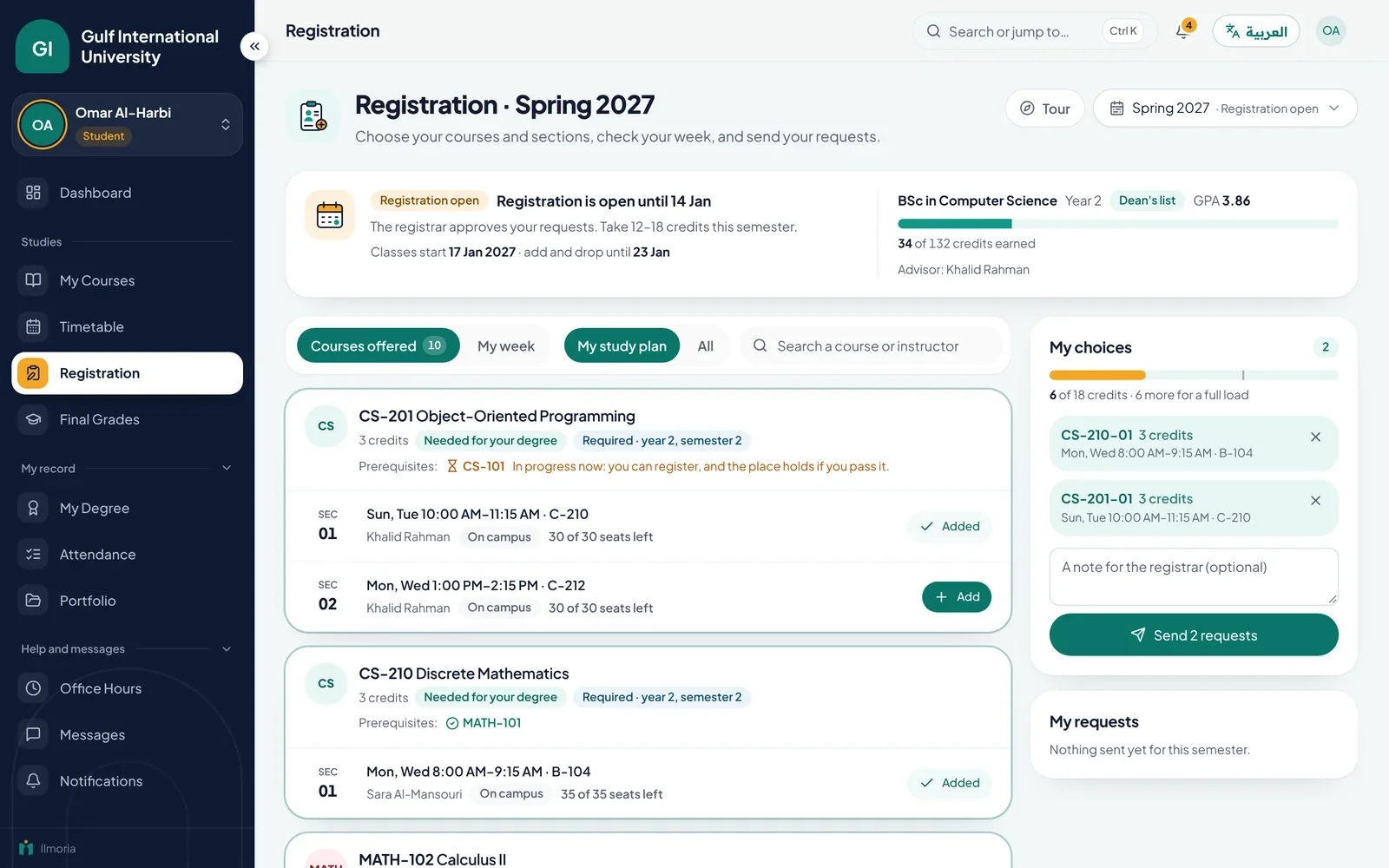
When registration opens, students see the sections offered to them, with times, rooms, instructors and seats left. They add the sections they want, watch their timetable take shape and send their requests, with a note if something needs explaining. They can add and drop courses during registration and in the add and drop period after classes start. Every request shows its status, pending, approved, waitlisted or declined, so nobody queues at the registrar's office just to ask. Students check what their study plan still expects on the academic records page.
What the course registration system checks on every request
Before anyone approves a request, Ilmoria shows what stands in its way. The checks follow the course catalogue, where each course lists its prerequisites, and the rules of the semester itself. Staff see each problem next to the request, so a decision takes seconds instead of a search through paper files and spreadsheets. A course the student has already passed is flagged too. Our guide to choosing a course registration system lists what else to test.
- Prerequisites: the student has passed the required courses, or is taking them now, which shows as provisional
- Timetable clashes: the section does not overlap another course the student is registered in
- Credit limit: the semester total stays within the maximum the registrar has set
- Seats: the section is open and has a free seat, or the student goes on the waiting list
Approval by the registrar or the academic advisor
Each university chooses how approval works. The registrar's office can approve every request, each academic advisor can approve requests from their own advisees, or requests can be approved automatically. Approving takes a seat. If the section is full, the request moves to the waiting list, and when someone drops, their seat goes to the first student waiting. Approval also enrols the student in the course on the platform, so lessons, assessments and the gradebook are ready from the first lecture. Whoever decides can add a note the student reads.
Timetables for students and instructors
Approved sections build the student's weekly timetable, with the day, time, room and type of each class and the semester's key dates beside it. Instructors see their sections and class lists. Online sections carry their meeting link, so a student joins a live lecture from the same screen. Instructors take attendance per section, and the attendance page explains how absence limits work. See how registration fits with the rest of the platform on the higher education page, or book a demo to try it with your own catalogue.
Common questions
What does a course registration system check?
Ilmoria checks four things on every request: that the student has passed the prerequisites or is taking them now, that the section does not clash with the student's other classes, that the semester total stays within the credit limit, and that the section is open with a free seat. It also flags courses the student has already passed. Staff see each problem next to the request before they decide.
Who approves course registration requests?
Your university chooses. Requests can go to the registrar's office, to each student's academic advisor, or be approved automatically. Whoever decides can approve a request, decline it or move it to the waiting list, and add a note the student reads. The setting applies to the whole university, and an administrator can change it at any time.
How do waiting lists work?
If a section is full when a request is approved, the student goes on the waiting list instead. When a registered student drops the section, the free seat goes to the first student on the list. Students can join or leave a waiting list themselves and always see the status of each request, so the registrar's office answers far fewer emails in the first week of term.
Can students add and drop courses after the semester starts?
Yes, during the add and drop period. In the semester's academic calendar, the registrar sets when registration opens and closes and when the add and drop period ends. Students can change their courses until that date, and the same checks apply to every new request. Once the period is over, registration closes for that semester.
Is registration connected to the courses on the platform?
Yes. Approving a request enrols the student in the course in Ilmoria, so it appears in their course list with its lessons, quizzes and assignments. Final grades from the course feed the student's academic record, where semester and cumulative GPA are calculated. Nobody exports data from one system and imports it into another.
Is there a credit limit per semester?
Yes. The registrar sets the minimum and maximum credits for each semester. A request that would take a student over the maximum is flagged before anyone approves it. Credits come from the course catalogue, and the student's approved credits are added up as they register, so the total on screen is always current.
See how Ilmoria would work in your school
A 30-minute call with a product specialist. Bring your timetable, your grading rules and your toughest question, and we’ll show you how Ilmoria handles them, in English or Arabic.
Or email sales@ilmoria.com