An LMS for Islamic schools, with English and Arabic side by side
Ilmoria is an LMS for Islamic schools, weekend and evening madrasas and Arabic programmes in the US, the UK, Canada, Europe, Australia and beyond. Maths and science can run in English while Arabic, Qur’an and Islamic studies run in Arabic, with one gradebook, one parent portal and one admissions process for all of them. Every screen works in English and in Arabic, fully right to left. Try a free demo school with sample data.
The challenges Islamic and Arabic schools face today
Two languages in one school day
The main curriculum is taught and inspected in English, while Arabic, Qur’an and Islamic studies are taught in Arabic. When a platform can’t handle right-to-left text, those subjects end up on paper and in chat groups, outside the school’s records.
Parents who read different languages
In one community, some parents read English first and others Arabic, and many families have several children at the school. Reports and messages in only one language leave some parents out.
Weekend and part-time programmes
Saturday, Sunday and evening classes bring together children of different ages and levels, often taught by part-time teachers. Marks, fees and messages kept on paper and personal phones are hard to follow from one week to the next.
A small office with a lot to do
Admissions, fees, records and parents’ questions often rest on a few people. Inspectors, accreditors and boards still expect clear records of teaching, marks and contact with families.
How Ilmoria helps Islamic and Arabic schools
- Arabic, Qur’an and Islamic studies as ordinary courses
- Ilmoria doesn’t impose a curriculum: you create a course for each subject and choose its language. Arabic, Qur’an and Islamic studies teachers build lessons in Arabic in the course builder, with slides, video, files and activities such as click the words and sort it, and upload the textbook you already use as a PDF course book in which students highlight, take notes and keep a vocabulary list. Their marks sit in the same gradebook as maths and science.
- English and Arabic, side by side
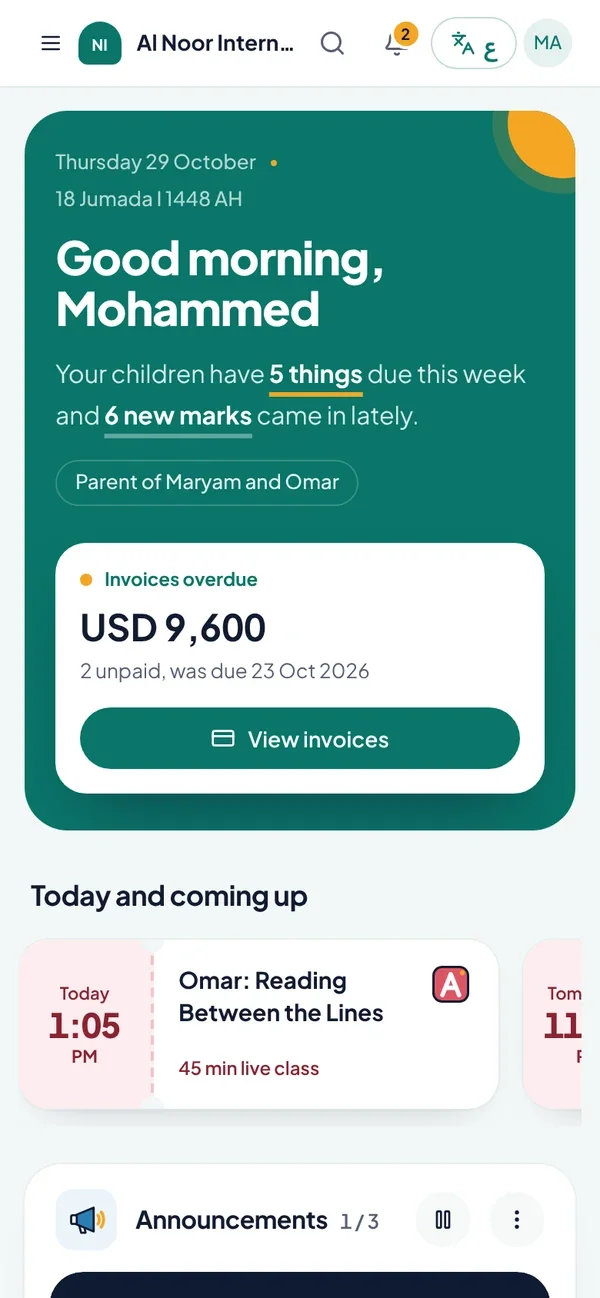
- Every screen works in English and Arabic, and each person picks their own language: a science teacher works in English while an Arabic teacher and a parent use Arabic, fully right to left. Announcements can carry both languages, and nothing people write is machine-translated. See Arabic and English.
- Parents who know what is happening
- In the parent portal, parents follow every child from one account, see grades and final results, message a teacher or the office about academic, attendance, payment or behaviour questions, and print invoices and receipts. Staff close each conversation once it is resolved, so nothing is lost on a personal phone.
- Admissions and fees without paper
- Families apply through a private link, upload documents and sit placement tests in maths, English and science. Your office reviews and accepts in admissions, parents sign the handbook and school policies online, and every invoice shows whether it is paid, overdue or in a grace period. Families pay the way they do today, and the office records each payment.
- Weekend, evening and online classes
- Set up each level or age group as a section with its own courses and timetable. Teach in person, or schedule live classes with a Zoom, Google Meet, Microsoft Teams or Jitsi link that students open from their dashboard, with self-paced lessons in between. It all works in the browser on a phone, with nothing to install.
- A certificate for every milestone
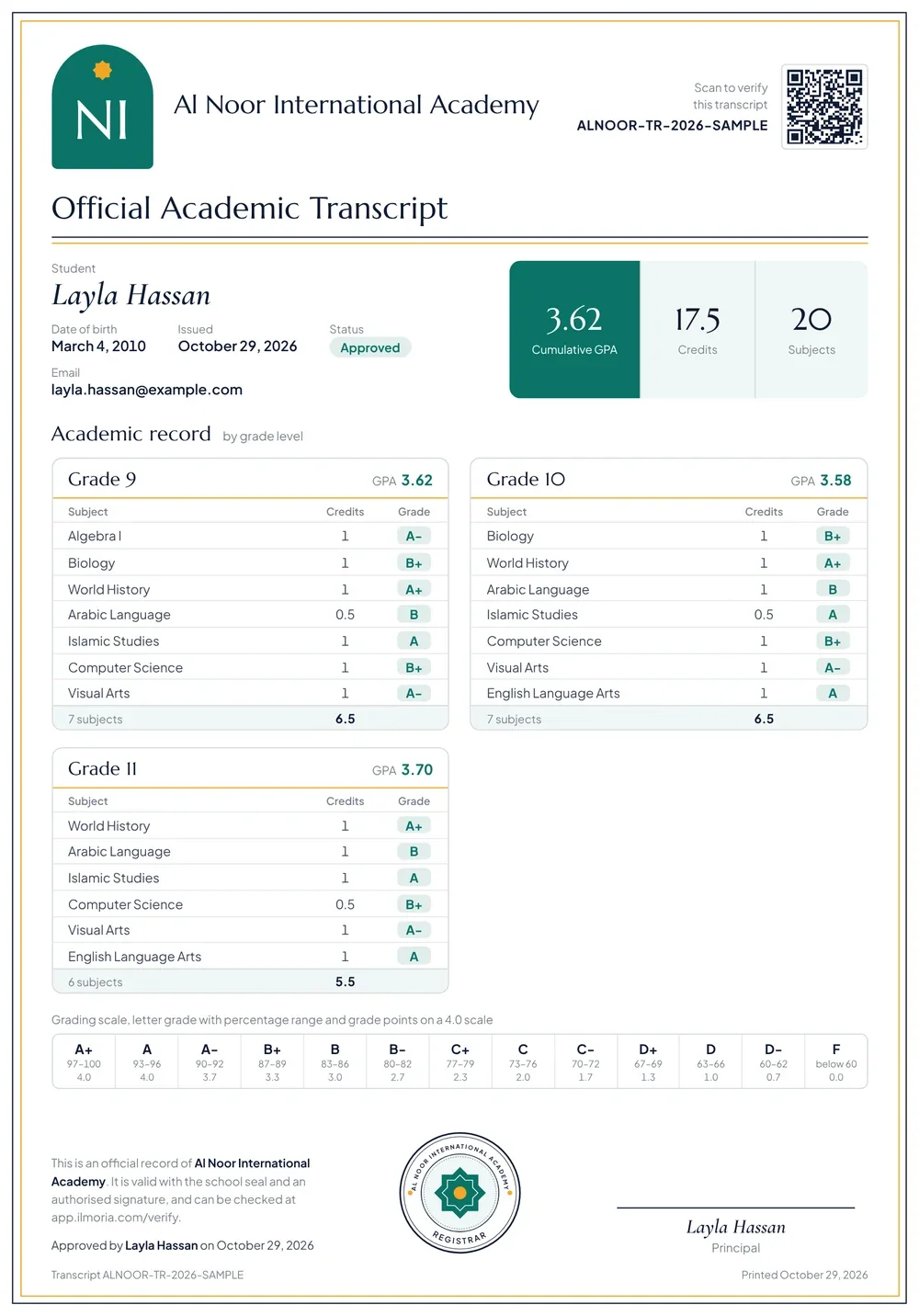
- Issue a completion or achievement certificate when a student finishes a level or a course, and a graduation certificate when they leave school, as PDFs in your design with a serial number and a QR code anyone can verify. Full-time schools also issue transcripts with GPA from locked final grades. See certificates.
Who uses Ilmoria in Islamic and Arabic schools
Principals and boards
Follow every class, approve final grades and transcripts, and log in as any user to see the school exactly as a parent or teacher sees it.
Teachers of every subject
Arabic, Qur’an and Islamic studies teachers work in Arabic, other teachers in English, and all of them mark, give feedback and message families in one place.
Parents
Follow each child’s progress in the language they read best, talk to the right person and keep track of fees.
Students
See lessons and homework for every subject, read their course books with notes and highlights, and see feedback and grades.
Office and admissions staff
Send application links, review documents, track signed forms, record payments and issue certificates.
The features Islamic and Arabic schools use most
- Arabic and EnglishEvery screen in Arabic and English, with full right-to-left layouts and bilingual documents.
- Course builderBuild courses from units, slide lessons, interactive activities and course books, in Arabic or English.
- Parent portalParents follow each child's grades and progress, message the right staff, and print invoices and receipts.
- AdmissionsPrivate application links, document uploads, placement tests, review and acceptance, and invoices.
- Live classesSchedule live classes for a section or grade with Zoom, Meet, Teams or Jitsi links on one timetable.
- CertificatesIssue certificates in your own design, with serial numbers and QR codes that open a public verification page.
Common questions
Can Arabic, Qur’an and Islamic studies run next to the main curriculum?
Yes. Each subject is its own course, and each course can be taught in English or Arabic. Your Arabic, Qur’an and Islamic studies teachers write their lessons in Arabic, your other teachers in English, and students see each course as it was written. All marks go into one gradebook, and parents see every subject in the same portal.
Does Ilmoria have a Qur’an memorisation (hifz) tracker?
Not as a dedicated feature. Schools record progress with the tools every subject uses: assignments and quizzes, rubrics written by your own teachers, and competencies in the gradebook that show mastery of specific skills over time. If memorisation tracking is central to your programme, bring your current records to a demo and we will show you honestly how they would look in Ilmoria.
Does Ilmoria work for weekend and evening schools?
Yes. Set up each level or age group as a section with its own courses, teachers and timetable. Students use lessons and course books between sessions, parents follow progress and fees in the portal, and teacher and parent accounts are free. Ilmoria runs in the browser on any phone or computer, so families need nothing but their sign-in details.
Do staff and parents have to use Arabic?
No. Each person chooses English or Arabic and can switch at any time. Staff who don’t read Arabic work entirely in English, and parents who prefer Arabic see every screen fully right to left. Lessons and messages stay in the language they were written in.
Can families pay fees online?
No. Ilmoria doesn’t take card payments. Families pay the school the way they do today, by cash, bank transfer, card at the office or cheque, and the office records each payment. Every invoice shows whether it is unpaid, paid, overdue, in a grace period or on hold, and parents print invoices and receipts from the portal.
How much does Ilmoria cost for a smaller school?
From $9 per active student a year, and teacher, parent and staff accounts are free. The smallest yearly agreement is $1,500, plus a one-off $500 for setup and training, which is included in two-year agreements. See pricing, or open a free demo school for 7 days.
See how Ilmoria would work in your school
A 30-minute call with a product specialist. Bring your timetable, your grading rules and your toughest question, and we’ll show you how Ilmoria handles them, in English or Arabic.
Or email info@ilmoria.com